Acumatica Stands Apart in the ERP World Acumatica has always differentiated itself in the ERP landscape, not just by what it does, but by how it’s built. Born in the cloud, it sidesteps the legacy tech debt that plagues many competitors, evolving freely to stay ahead of the curve.
At its heart is the XRP Framework, a modular architecture that swaps components and integrates new tech without outdated code or rigid limits. It supports multiple databases, interpretation layers, and languages with unmatched agility. This foundation powers Acumatica’s leadership in AI-driven ERP. More on that in future posts.
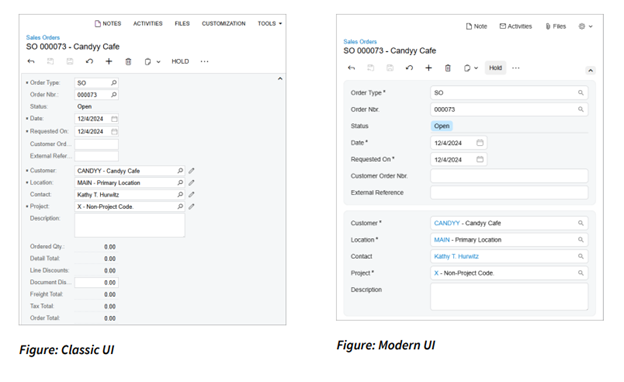
The Modern UI: is now generally available since September 23, 2025, the Modern UI is Acumatica’s bold second major interface evolution. It’s a full redesign of aesthetics and architecture, delivering responsive, intuitive experiences optimized for speed across desktops, tablets, and mobiles. No process disruptions here. The XRP Framework ensures seamless migration of your customizations, automating classic form conversions to preserve tweaks without rewrites.
Key pillars? No-code configuration, hyper-personalized usability, and blazing performance. Think: layouts that adapt to your role, quick filters slashing search times by up to 70%, and dashboards turning raw data into real-time decisions via built-in pivot tables. This is ERP reimagined for today’s mobile, distributed teams.
In future posts, we’ll explore how this same framework positions Acumatica to lead the charge in AI-driven ERP innovation.
Introducing the Modern UI
Modern UI is a comprehensive overhaul of both design and underlying architecture.
Launching for production use in 2025 R2, the Modern UI delivers a responsive, intuitive, and performance-optimized experience for every user. This marks Acumatica’s second major UI evolution, achieved without disrupting existing processes, a testament to the strength of its underlying XRP framework.
Acumatica’s Modern UI focus on no-code configuration, usability, personalization, and performance.
Key New Terminology
To become a power user in the new environment, here are a few terms to know:
Modern UI: The new responsive interface that adapts seamlessly to desktops, tablets, and mobile devices.
Fieldsets: Configurable groups of data fields that can collapse or expand for cleaner layouts. End users, not just developers, can adjust them to match their workflows.
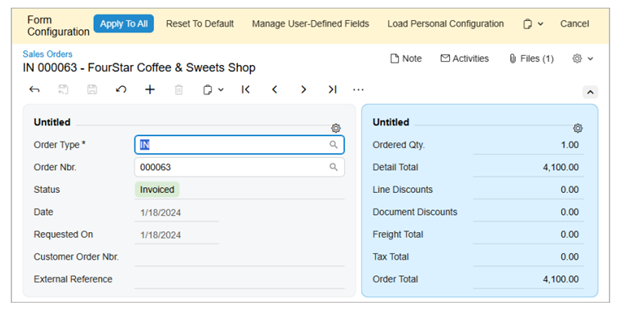
Form Configuration Mode: A redesigned, intuitive way to configure forms and layouts directly within the UI.
Systemwide vs. User Personalization: System administrators can enforce consistent configurations across all users, while individuals can still maintain their personal preferences across fieldset’s verboseness.
Why the Change?
When Acumatica’s Classic UI was released, the digital landscape looked very different. Most users worked from desktop computers with limited bandwidth and minimal device diversity.
Fast forward to today, and the workplace is mobile, distributed, and dynamic.
Users now demand:
Responsive design across laptops, tablets, and phones
Unified navigation and intelligent menus
Smarter alerts and error handling
Faster, more efficient performance
The Modern UI directly addresses these needs, enhancing flexibility without forcing users into a steep relearning curve.
Getting Started: Two Key Features to Explore
If you’re ready to dive in, here are two areas that will make the biggest impact right away:
Fieldsets
Configure fieldsets to include or exclude data points based on specific user workflows. Cleaner screens mean faster navigation and fewer distractions.
Open the Screen to configure and use Settings > Screen Configuration to enter Form Configuration mode.
In the fieldset’s top-right corner, click Settings to open Section Configuration.
Make changes as needed, for example:
Rename the fieldset title.
Add UI elements (drag from Available to Selected).
Remove personalized UI elements (default ones can’t be removed).
Toggle Tab (focus order), Pin (show when collapsed), or Visible (hide/show).
Reorder elements by dragging.
Click Apply in Section Configuration, then Apply to All (Form Configuration pane) to publish the shared layout; choose whether to keep or override users’ personal configs.
Tabs and Columns
Customize your views to mirror your team’s natural workflow. By removing unnecessary elements, you’ll simplify onboarding, speed up training, and improve overall ERP adoption.
Open the Screen to configure and use Settings > Screen Configuration.
Click the tab control’s Settings button to open Tab Configuration.
In Tab Configuration:
Hide/Show tabs (move between Visible Tabs and Hidden Tabs).
Reorder tabs by dragging.
Reset to Default if needed.
Apply to save.
Back in the Form Configuration pane, use Apply to All to share the layout (and decide whether to preserve or override personal layouts).
More Than a Facelift
Expert Insights: Hear from Crestwood’s UI Wizards Want a front-row seat to the Modern UI’s magic? Our in-house development team, certified Acumatica Developers who have customized hundreds of instances, recently hosted a LinkedIn Live deep dive on these changes:
Ready to take the next step, contact our Crestwood Customer Success team and evaluate if the Modern UI is the best next step for your organization.
At Crestwood, we’ve codified best practices in a living playbook, turning the Modern UI into a competitive edge. It trims training from weeks to days, spikes user satisfaction (via intuitive personalization), and scales seamlessly as your business grows. This is powered by features like AI-assisted form fills and automated migrations. Early adopters report 30% faster task completion.
Our devs are at the forefront. They’ve led pilots integrating Modern UI with AI Studio for one-click workflow automations, like generating item descriptions via OpenAI.
Ready to Upgrade? Don’t wait. 2025 R2’s Modern UI is live now. Contact Crestwood’s Customer Success team today for a free audit: Is it time to future-proof your ERP? Let’s evaluate and migrate together.
Ready to Experience the Power of Acumatica?
Learn how Crestwood Associates helps growing businesses implement, customize, and optimize Acumatica for long-term success.
Director of Acumatica Services at Crestwood | Leading Exceptional Teams to Drive Growth, Resolution, and Lasting Success | MVP, Community Hero, Impact Player | Data Obsessed.