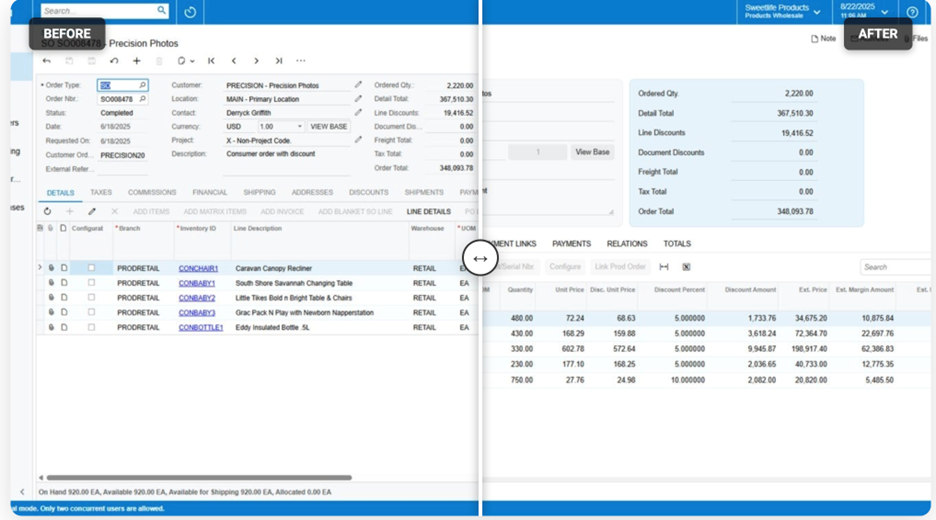
Acumatica 25 R2 introduces a redesigned Modern User Interface that focuses on efficiency, configurability, and usability without compromising control. While the visual updates are immediately noticeable, the real value of the Modern UI lies in how it empowers users and administrators to tailor screens, workflows, and data views to their roles and priorities.
This release represents a meaningful step forward for organizations looking to improve adoption, reduce friction in daily transactions, and make ERP screens work the way their teams do. Below, we break down the most impactful UI enhancements in Acumatica 25 R2 and explain what they mean in real-world use.
A More Efficient, Responsive Interface
One of the most visible improvements in Acumatica 25 R2 is how screen real estate is managed. Transaction screens now allocate more space to header details while maintaining a clean, modern layout that adapts smoothly across different screen sizes.
Users can collapse or expand less frequently used sections, allowing them to focus on the fields that matter most in the moment. This responsive behavior makes Acumatica feel just as usable on a laptop or tablet as it does on a large desktop monitor.
Generic Inquiries also benefit from a refreshed look, making high-volume data review easier and more intuitive. File attachments have been modernized as well, with improved usability and tighter integration with scanning tools and the mobile app, reducing friction for document-heavy processes.
User-Driven Field and Layout Customization
Acumatica 25 R2 places more control directly in the hands of users when it comes to how screens are organized.
Fields can be hidden or displayed quickly, reordered using drag-and-drop, and resized to better accommodate longer descriptions or critical data. Tabs can be rearranged or hidden entirely, allowing users to streamline screens based on how they actually work rather than relying on a one-size-fits-all layout.
These changes reduce visual clutter and help teams move faster, especially in transaction-heavy areas like invoicing, purchasing, and customer management. Importantly, many of these adjustments can be made without administrative intervention, improving flexibility while maintaining governance.
Advanced Screen Configuration for Administrators
For administrators, the Screen Configuration Tool in 25 R2 introduces a powerful yet structured way to manage screen layouts and fields.
Administrators can:
Add custom fields natively to screens without losing default behaviors
Place new fields into specific sections for logical grouping
Control whether changes are applied globally or preserved as personal configurations
Export and import screen configurations between environments
This is especially valuable for organizations managing multiple tenants or environments, as it simplifies the promotion of tested configurations from sandbox to production. The ability to reset screens back to default also ensures changes remain reversible, supporting safer experimentation and cleaner implementations.
Stronger Filtering and Generic Inquiry Enhancements
Generic Inquiries continue to evolve in 25 R2 with more advanced filtering capabilities. Users can now toggle logical conditions more easily and save frequently used filters for future access, reducing repetitive setup.
Advanced mode enhancements allow quicker modification of joins and data exposure directly within the inquiry interface. A new Interface Options tab provides clearer control over how inquiries behave in the UI and mobile application.
These updates make Generic Inquiries more accessible to functional users while still providing the depth technical users expect.
Modernized Dashboards for Better Visibility
Dashboards in Acumatica 25 R2 receive a visual refresh that improves readability and usability without changing underlying functionality. Tiles, charts, and widgets are cleaner and easier to scan, supporting better at-a-glance decision-making.
For finance and operations leaders who rely on dashboards to monitor KPIs, this upgrade improves clarity while maintaining the flexibility to tailor dashboards to specific roles.
Governance, Security, and the Classic UI Option
Acumatica maintains a clear separation between personal customization and system-wide configuration. Only users with administrative permissions can publish changes that affect others, ensuring consistency and control.
While users may still revert to the Classic UI in 25 R2, it is important to note that this option is being phased out in future releases. Organizations evaluating the Modern UI now will be better positioned for long-term adoption and smoother upgrades moving forward.
Why This Matters for Growing Organizations
The Acumatica 25 R2 Modern UI is not just a cosmetic update. It reflects a broader shift toward user-centric ERP design, where flexibility, efficiency, and role-based experiences are built into the platform.
For growing businesses, these enhancements mean:
Faster user adoption
Reduced training overhead
Cleaner, more relevant screens
Greater confidence when scaling or customizing ERP processes
At Crestwood Associates, we see these updates as a strong foundation for improving both day-to-day usability and long-term system scalability.
If you are planning an upgrade to Acumatica 25 R2 or want guidance on how to configure the Modern UI to support your workflows, our team can help you evaluate and implement these features with confidence.
Ready to Experience the Power of Acumatica?
Learn how Crestwood Associates helps growing businesses implement, customize, and optimize Acumatica for long-term success.