In your Management Reporter (MR) reports, have you experienced an issue where the favorable or unfavorable variance amounts between actuals and budgets in an income statement aren’t presented correctly? A favorable sales variance may be incorrectly presented as a negative amount and the expense may be presented correctly or vice versa.
A way to overcome this is to use the XCR Print Control in the CALC column, for the Column Definition, as follows:
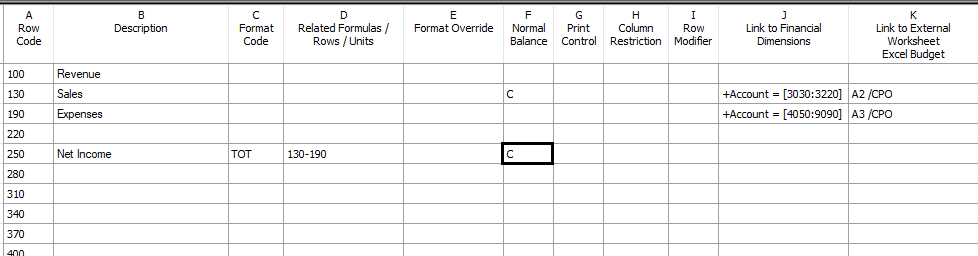
First, make sure the revenue/income rows, in the Row Definition, have a C in the Normal Balance column.
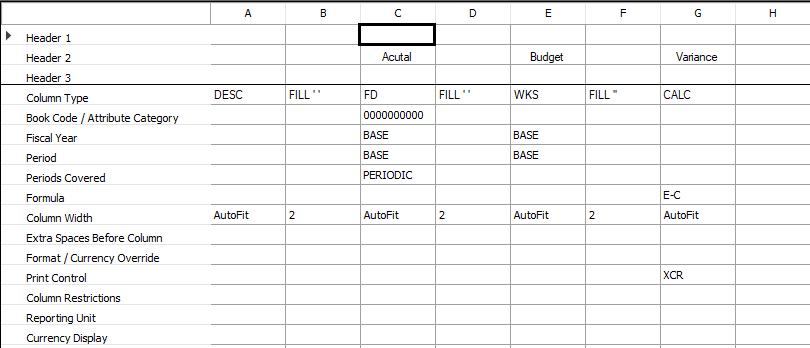
Next, set the Print Control to XCR in the CALC column for the Column Definition. This code will reverse the sign of a CALC column amount if the typical balance of a given row is a credit (as identified by a C in the Normal Balance column of the row definition).
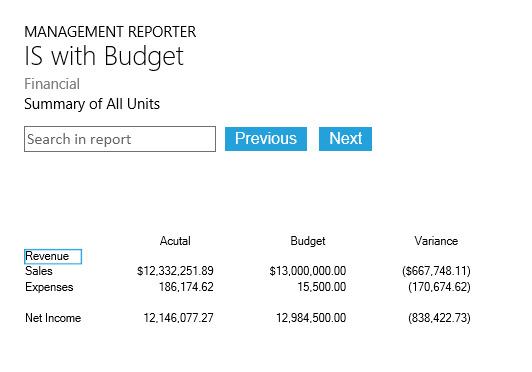
The variance will now be presented correctly in the report.
Here are a few more helpful posts on MR formatting: