The Business Central guided tour for finance and operations teams outgrowing disconnected systems

Five chapters built from what Crestwood clients changed after they moved. Pick the chapter that sounds like your week, or start with chapter one.

Chapter 1 · Step 1 of 3 · Select the blue dot or use the arrow keys
bc tour screen 1 1

You have seen the software

The harder question is what your business needs from it.

A tour shows what Business Central can do. It cannot tell you which of those screens would change your month, or whether the system is the problem at all.

The business may not have a people problem. It may have an operating model problem.

Your data, loaded into Business Central. A Crestwood industry expert shows your own reports and workflows running live, so you judge the fit on real numbers.

What it costs

What the licenses cost, before anyone calls you.

Microsoft publishes list prices for Business Central. Most companies mix plans: full users on Essentials or Premium, and people who only look up, approve or make light edits on Team Members.

Licenses, paid to Microsoft

Licensed per named user, per month. Essentials covers finance, sales, purchasing, inventory and projects. Premium adds manufacturing and service management.

PlanPer user, per monthBuilt for
Essentials$80, paid yearlyFinance, sales, purchasing, inventory, projects
Premium$110, paid yearlyEverything in Essentials, plus manufacturing and service
Team Members$8, paid yearlyLook up records, approve, and make light edits

Microsoft list prices in US dollars, as published on microsoft.com on 19 October 2026. Your actual price depends on currency and region. The implementation cost depends on scope, and the assessment ends with a recommended next step and what it would cost.

Still on Dynamics GP?

Beyond Dynamics GP lays out what changes, what carries over and what to decide first, so the move is planned before anyone picks a date.

Download the eBook

Building the business case?

A Forrester Total Economic Impact study, commissioned by Microsoft, measured companies that moved to Business Central: over 200% ROI over three years and payback in under six months.

Download the Case Study
See what’s slowing us down

“We probably just need to train the team better.”

Sometimes that is true. More often the team is working around a system that was set up for a smaller version of the business, and no amount of training fixes a workaround.

The business may not have a people problem. It may have an operating model problem.

The Business Optimization Assessment looks at five areas with your finance and operations leads: workflow, reporting, system utilization, connected systems, and finance and controls. You leave with a written summary of what we found, prioritized, actionable, and yours to take back to your leadership team. What you do with it is entirely up to you.

What you leave with

  • A written, prioritized summary within 24 hours
  • A read on each area: people problem or operating model problem
  • Three to five opportunities, each with an owner and a rough effort
  • What the current state is costing, using your numbers, never invented ones
  • A recommended next step and what it would cost
Finance lead: identify where finance is losing efficiency.
Operations lead: pinpoint where operations are slowing down.
Book My Assessment
Travis BrooksTravis Brooks
ERP solution expert
How Crestwood implements Business Central

A Non-Event Go-Live starts with the data, not the training.

The projects that go badly usually go badly at data migration and cutover, long before anyone logs in. So that is where the work starts.

PHASE 1

Governance first

Working sessions on a fixed cadence, named owners on both sides, and milestones everyone can see.

You own: decisions and sign-off
PHASE 2

Clean data before it moves

Subledgers are tied to the general ledger and errors are corrected, so the opening balances are right on day one.

We own: validation and cleanup
PHASE 3

Training by role

Each department trains on its own work, with accountability for readiness before go-live.

Both: readiness sign-off
PHASE 4

Controlled cutover

A sequenced cutover plan, integrations tested end to end, and support from the first morning.

We own: cutover and day-one support

At Wet & Forget, that sequence protected a retail EDI operation where a shipment error can cost up to 25 percent of the order value. Book My Assessment

Client stories

Three companies that moved, and what changed.

From Dynamics GP · Elgin, IL
3 days off month-end close

Wet & Forget

A PE-backed company with a strict retail EDI operation. Reconciliation one day faster, AP two days faster, reporting turned around in hours instead of two days.

“This was probably the best implementation by tenfold.”Amir Setork, VP of Finance
Read the Wet & Forget story
Multi-entity · Manufacturing and distribution
$12M client, numbers trusted again

Accountability Services

A CPA firm’s client was live on Business Central and still closing on manual adjustments. Crestwood corrected posting logic across sales, inventory and assemblies. Same software, set up properly.

“They were spending more time explaining the numbers than trusting them.”Accounting team, before the Crestwood engagement
Read the Accountability Services story
From Dynamics SL · Pensacola, FL
20 yrs on one platform, then moved

Levin Law

A law firm running Dynamics SL on a single on-premises server moved to Business Central, with faster data movement between Excel and the ERP and less infrastructure risk.

“We leaned very hard on your implementation team to help guide us toward end goals.”Jimmy Holmes, Director of Information Systems
Read the Levin Law story

Already running Business Central with Crestwood? Support and the Solution Optimization Assessment are on the client side.

Go to the Client Support Portal
Travis Brooks, Crestwood Associates
Ready to talk now

Talk to Travis Brooks about your Business Central project.

Travis works with finance and operations teams deciding whether, when and how to move. Bring your current system, your user count and your timeline.

Why Crestwood

The partner decides whether the software ever works as intended.

Options, not a single answer

Crestwood sells and supports both Business Central and Acumatica. Because we have options, we recommend the platform that fits how your business runs.

Development and support under one roof

Our development and support teams work in-house at Crestwood. The people who scope your project are the people who deliver and support it.

The relationship outlasts the software

Companies have worked with Crestwood across several generations of Microsoft ERP. Crestwood has been in business since 1998.

We sell, implement, support, and optimize it. An in-house team of industry experts. One hand to shake.

Microsoft Solutions Partner, Business ApplicationsCrestwood Associates, ERP Solution Experts
Before you book

Three questions finance and operations leaders ask first.

How long does a Business Central implementation take?

Crestwood’s Rapid Start scopes most projects at 8 weeks for financials, 10 to 12 weeks with inventory or projects, and 16 weeks with manufacturing. The assessment sets the scope, so the timeline you get is for your business rather than a range on a web page. See how a GP to Business Central migration runs

What happens to our historical data?

You decide what history comes across and what stays archived. Subledgers are tied to the general ledger and errors are corrected before anything moves, so opening balances are right on day one. Wet & Forget found and corrected hundreds of erroneous line items during that cleanup. Read how to plan a low-risk GP migration

Will our team actually use it?

Each department trains on its own work before go-live, with readiness signed off role by role. Business Central also runs inside Outlook, Excel and Teams, so much of the day happens in tools people already know. At Levin Law, users adapted quickly after moving off a 20-year-old system. Read the Levin Law story

Find out what your month would look like on Business Central.

You leave with a written, prioritized summary of what is slowing the business down, yours to act on with us or without us.

Read the complete tour

What the tour covers

Chapter 1: Close the month in days, not a week

For controllers and finance managers.

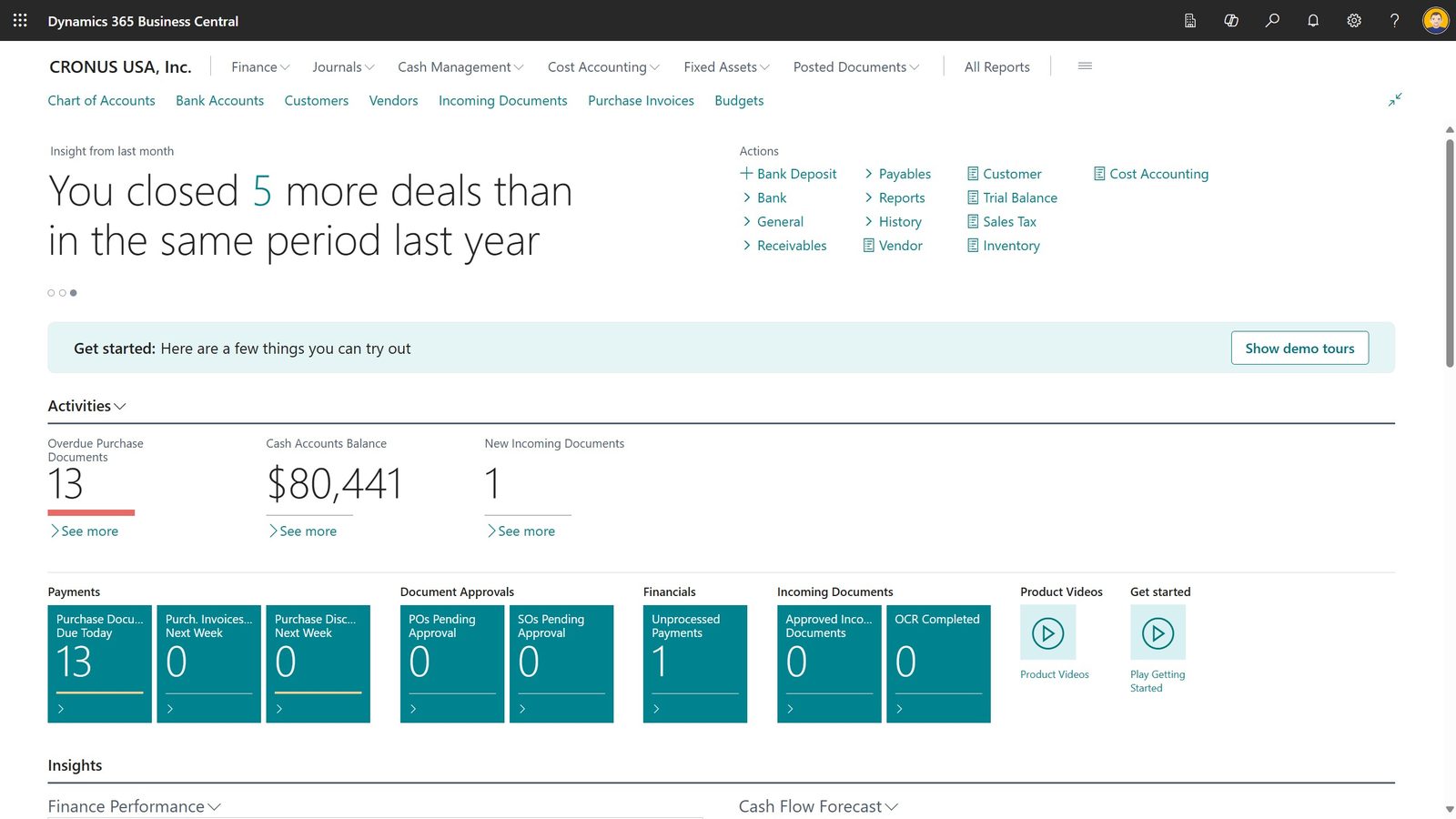
  1. Start the day on what is still open. The accountant’s home page counts what holds up the close: overdue purchase documents, payments due, approvals waiting and incoming documents. Select any count to open the list behind it.
  2. Let the bank match itself first. Payment reconciliation matches bank transactions to open entries and grades each match high, medium or low. Your team reviews the low-confidence lines instead of ticking every one.
  3. Run the statements without rebuilding them. Trial balance, balance sheet and income statement run straight from the ledger for any period. No export, no spreadsheet rebuild.

Chapter 2: Trust the number the first time it comes out

For CFOs and controllers.

  1. See the entries before anything posts. Preview Posting shows every ledger entry a document will create, account by account, before it touches the books. Mistakes get caught on screen, not at close.
  2. Tag the numbers the way you run the business. Dimensions such as department, location or project travel with every entry, so results can be cut any way leadership asks without a separate spreadsheet.
  3. Trace any figure back to its document. Every ledger entry carries the document that created it, so explaining a number takes one click instead of an afternoon.

Chapter 3: Run every company from one login

For multi-entity finance teams.

  1. Each entity, its own books, one environment. Each legal entity is its own company with its own chart of accounts and permissions. The company name sits in the header, so nobody posts to the wrong one.
  2. Post intercompany once. An intercompany transaction sends a matching entry to the partner company, so both sides of the books agree without a second keying.
  3. Consolidate without the spreadsheet. Consolidation brings each business unit’s results into one reporting company, with eliminations, ready for the financial statements.

Chapter 4: See orders and stock without calling the warehouse

For COOs and operations leads.

  1. Check what you can promise before you promise it. Item availability shows requirements, receipts, quantity on hand and projected balance by location, so sales quotes a date the warehouse can hit.
  2. See which orders are stuck before the customer calls. The sales home page counts orders ready to ship, partially shipped and delayed. Select a count to open the orders behind it.
  3. See what is sitting on the shelf. Item age composition shows how long stock has been on hand, period by period, so slow movers surface before they turn into write-offs.

Chapter 5: Work in the tools your team already has open

For every user.

  1. Edit a list in Excel and publish it back. Open journal lines in Excel, make the changes, and publish them back to Business Central. No export, rekey and import.
  2. Answer from Outlook. The Business Central pane in Outlook shows the vendor or customer behind an email, with balances and open documents, without leaving the inbox.
  3. Share the report where the team talks. Business Central reports go straight into a Teams conversation, so the discussion happens next to the numbers.
A Shield CompanyBack to top