
Acumatica Open University is now Beacon, at beacon.acumatica.com. Acumatica said Open University would stop being available in September 2026. Training guides moved to Training, developer training to Code, videos to Watch, job aids to Download, and documentation and release notes to Read. Sign in with your Acumatica Portal credentials to see the rest.
From Crestwood Associates, an award-winning Microsoft partner and Acumatica Partner of the Year, trusted by clients like MiiR, Premier 1 Supplies and Alpha Insulation & Waterproofing.
If an old Open University bookmark now sends you to a dead end, most of what you used still exists. It moved. Acumatica built Beacon as one place for documentation, release notes, known issues, job aids, training, videos and knowledge base articles, and in its own words, “Beacon replaces the Open University and its content.” The old Help Portal folded into it too.
Two things did not move as they were. The interactive Getting Started and Release Spotlight courses left on 21 April 2026 to be rebuilt. And Beacon is arranged by type of content and by the work you are doing, not by the course catalog you remember. That second change is why searching an old course title often comes back empty.
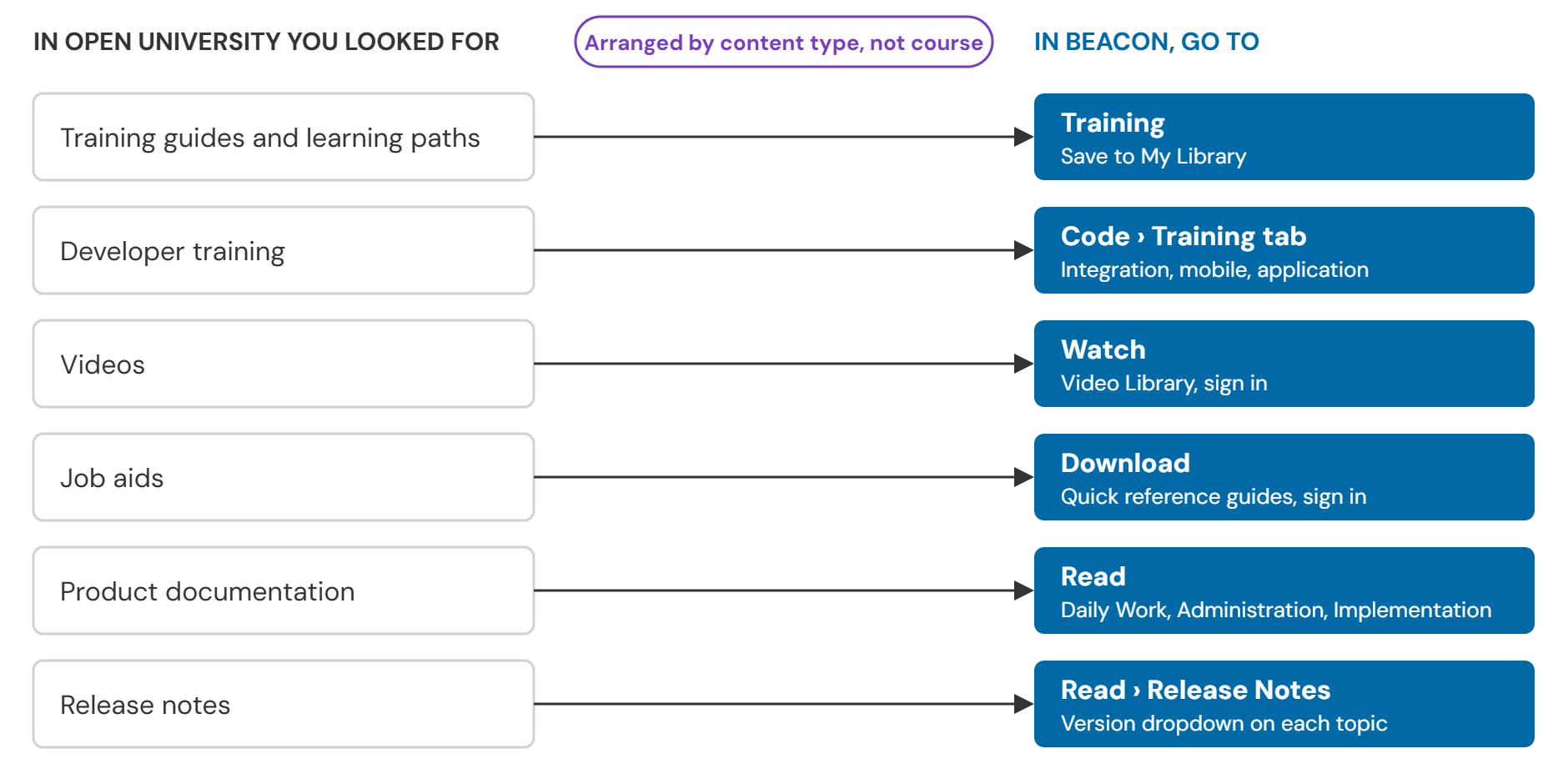
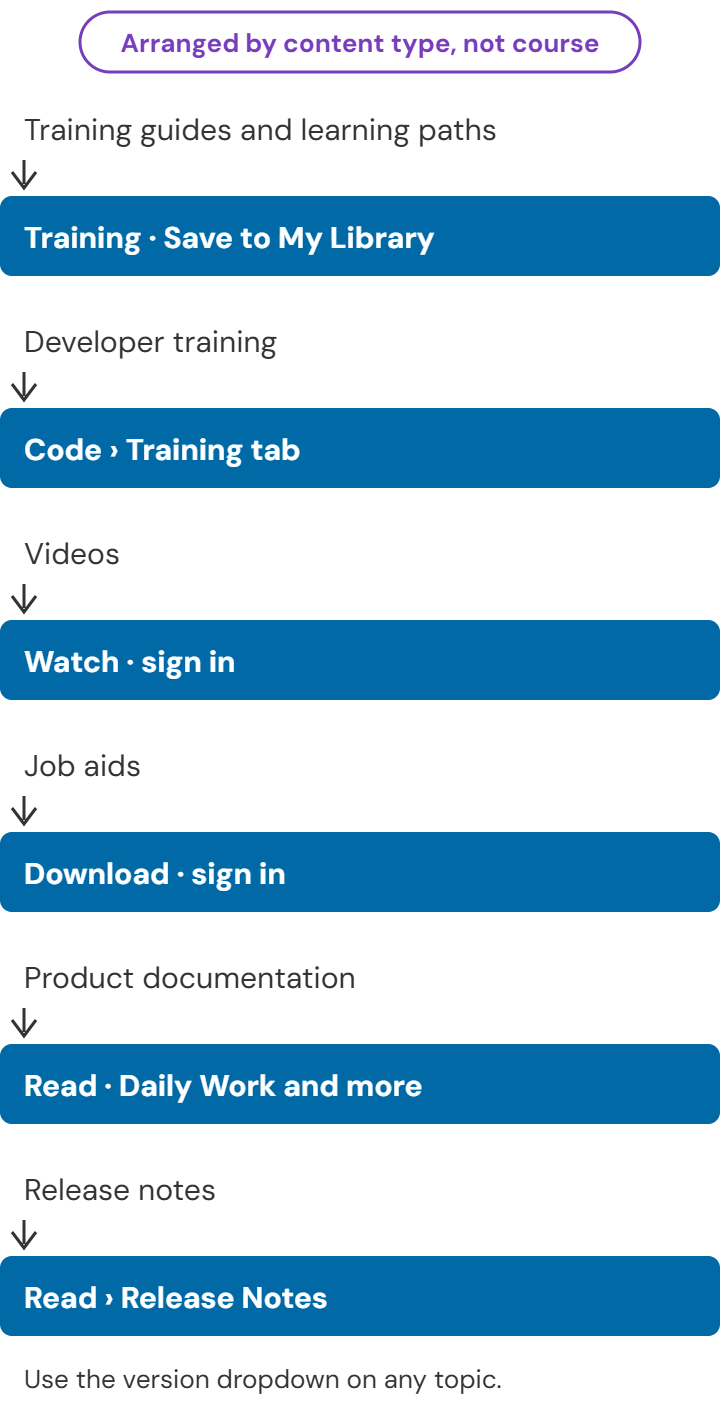
Where Acumatica Open University content lives in Beacon
Six kinds of Open University content now sit under five Beacon menus. Training guides and learning paths are under Training. Developer training is under Code, on its Training tab. Videos are under Watch. Job aids are under Download. Product documentation and release notes are under Read. Acumatica published the same mapping in July, and the table below adds what you will find inside each one.
| What you used in Open University | Where it is in Beacon | What you will find there |
|---|---|---|
| Training guides and learning paths | Training | Daily Work and Implementation module training. Save to My Library copies a path into your personal books |
| Developer training | Code, Training tab | Integration Developer, Mobile Application Developer and Application Developer guides |
| Videos | Watch | Video Library, including Finance and Accounting for AP and AR clerks, Project Accounting, Connector and System Administrator |
| Job aids | Download | Quick reference guides for Administration, Finance and Accounting for AP and AR clerks, and Project Accounting. The home page tile is labeled “Jobs Aids” |
| Product documentation | Read | Daily Work module guides, Administration guides and Implementation guides |
| Release notes | Read, Release Notes tab | Current and previous releases. 2026 R2 documentation arrived on 5 October 2026, and a version dropdown beside each topic switches releases |
Signing in, and what you miss without it
You can read Beacon’s public documentation without an account. Sign in with the same Acumatica Portal single sign-on credentials you already use, and Beacon adds job aids, the Diagram Album, personal books and content matched to your role. Acumatica says the full video library is for partners and customers with an active contract. If a resource you expect is missing, check that you are signed in before you check anything else.
Three Beacon tools for training and repeat procedures
Three tools matter to someone who trains staff or runs the same procedure every month. The Diagram Album draws Acumatica processes as flowcharts; it lived under Job Aids in Open University and now sits under Download, in a new edition published in July 2026. Any documentation topic can be printed or saved as a PDF. Personal books let you assemble your own guide from Acumatica’s content plus your own notes, then download it. Each takes a few clicks once you know where the control is, and the steps below show where.
Diagram Album
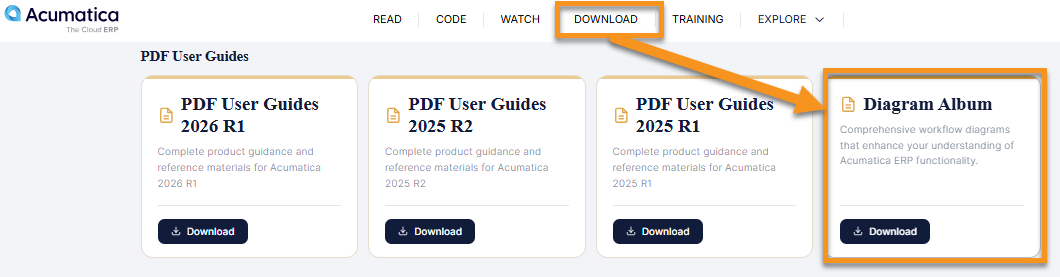
The Diagram Album is a PDF of process diagrams for the current Acumatica release: workflows, system interactions and the branches a process can take. Sign in, open the Download menu at the top of the page, scroll to the end of the PDF User Guides list, and select Download next to Diagram Album.
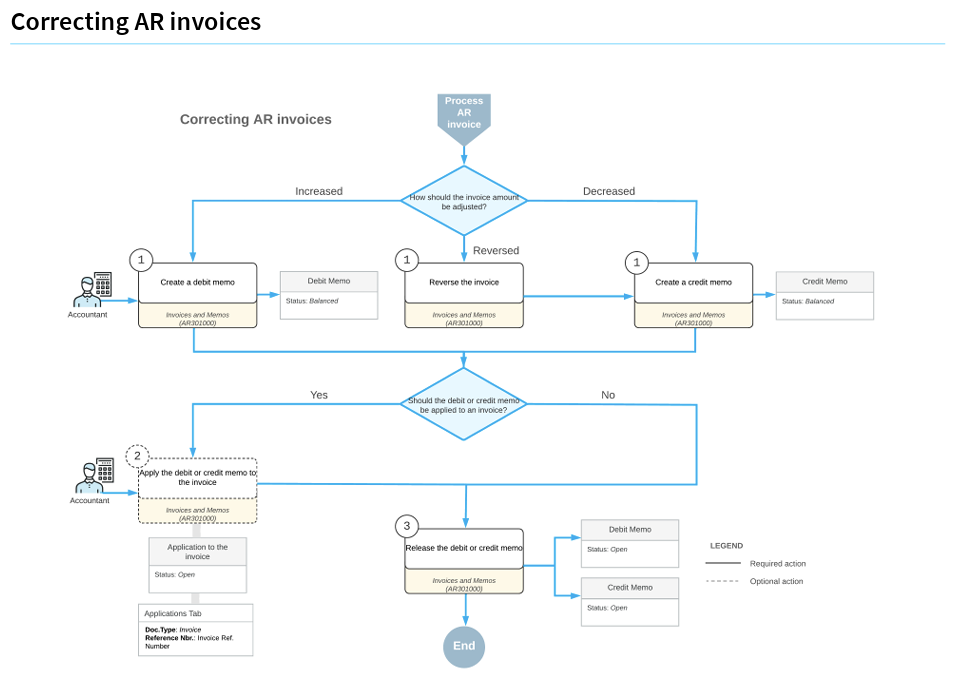
The value is the branch logic. A guide tells you how to correct an invoice. A diagram shows you every route the correction can take, which is what a new AP or AR clerk needs before they touch a live document. If your team is learning Acumatica financial management, start here.
Print a topic or save it as a PDF
A printed topic is useful for a desk-side checklist, a training packet, or a site where the connection is unreliable. Beacon stays the current source; the PDF is a copy of one moment.
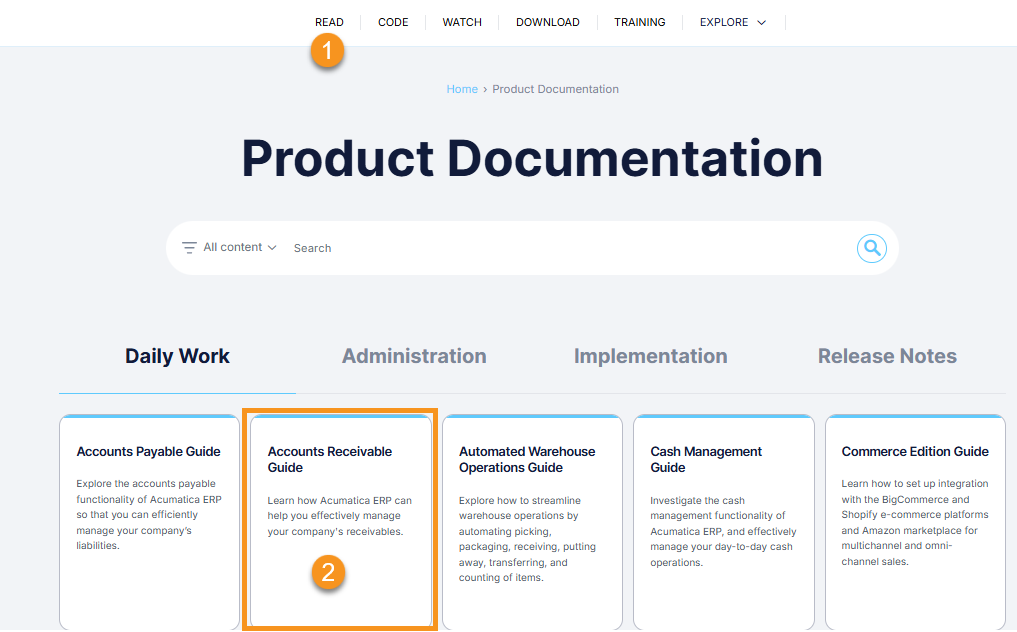
- Select Read at the top of the page.
- Under Daily Work, Administration, Implementation or Release Notes, open the guide you want.
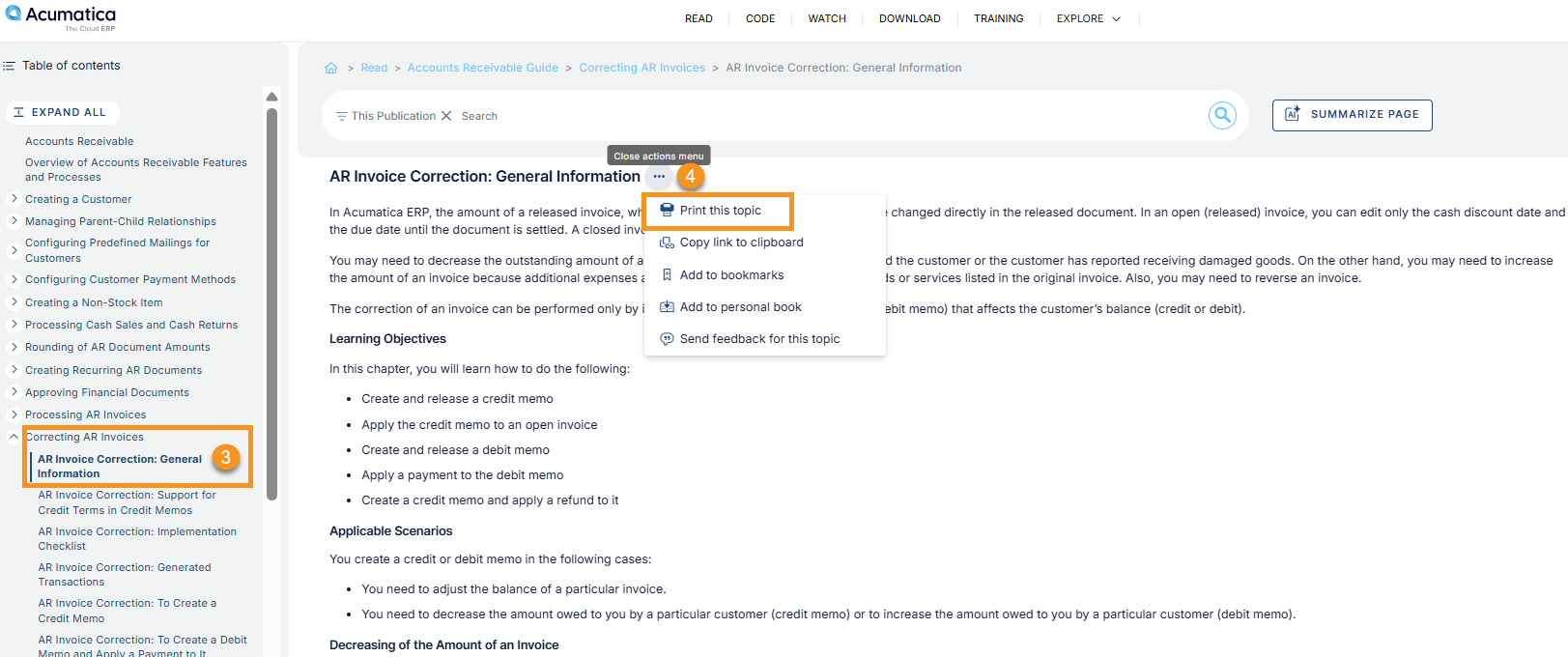
- In the left navigation pane, choose the topic you want.
- Select the More button (three dots) next to the topic, then Print this topic. The same menu offers Add to personal book, covered below.
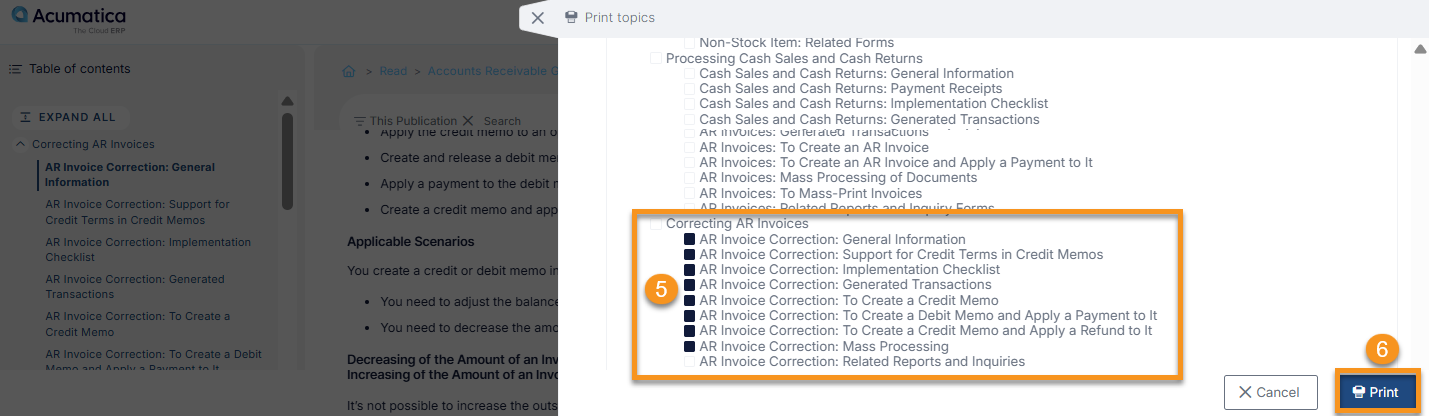
- A dialog asks which topics to include. Check whole sections or individual subsections.
- Select Print. Your browser’s print dialog takes it from there: choose a printer, or choose a PDF destination and save the file.
Personal Books
A personal book is your own guide, built from Beacon content. Save a learning path, pull in individual documentation topics, add your own notes or internal instructions, and keep it in one place. It suits a quick reference for a recurring task, onboarding a new user, or the procedures for one project. Acumatica’s posts call the same place both Personal Books and My Books.
Add training guides to your personal books
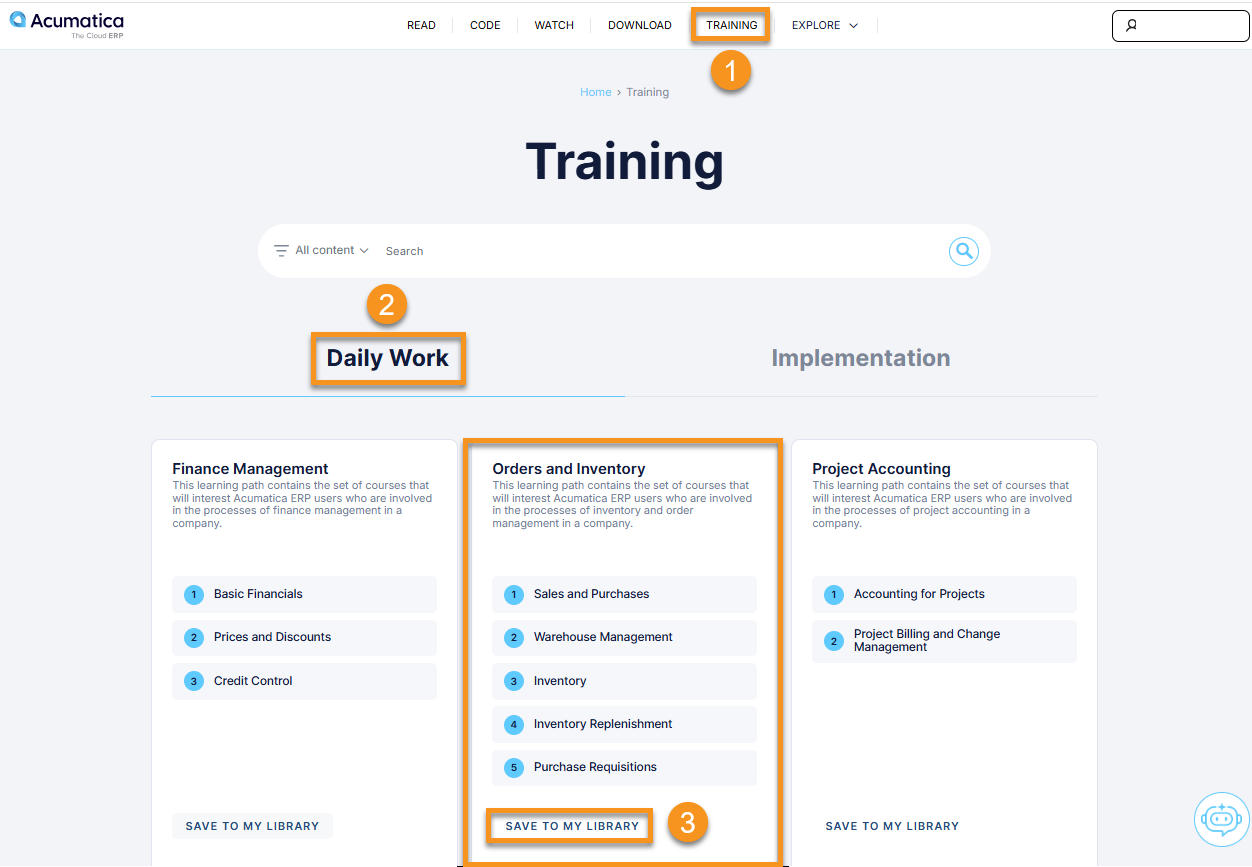
- Sign in and select Training at the top of the screen.
- Choose Daily Work for module training guides, or pick a learning path.
- Select Save to My Library. A confirmation shows that each section of the guide was saved.
Find your personal books
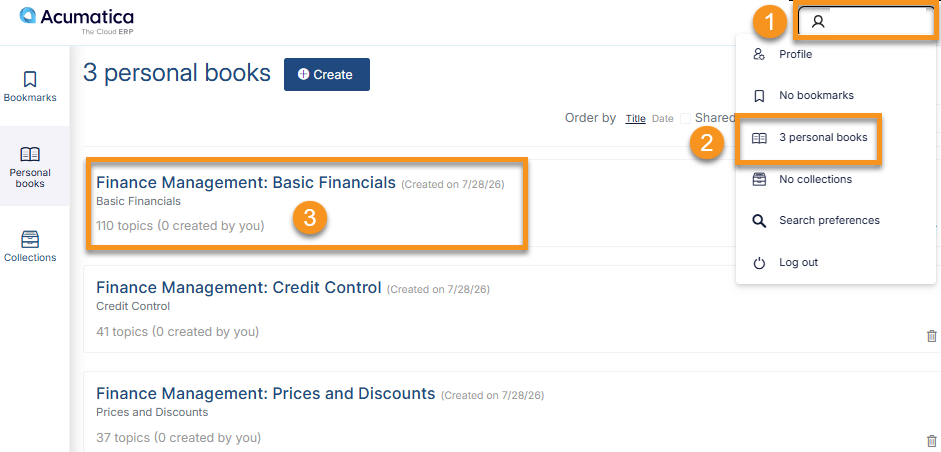
- Select your name in the top-right corner of the page.
- Select Personal Books. Each saved section appears as its own book. Open one by its title.
Edit a personal book
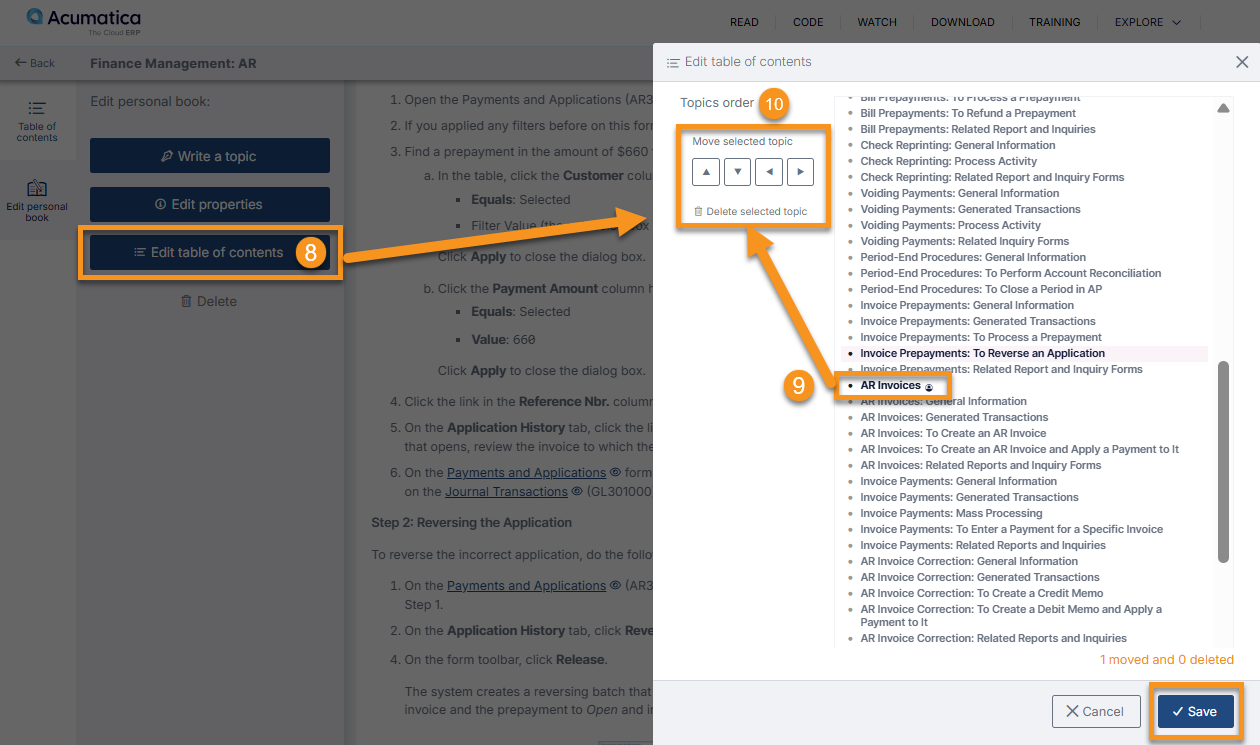
- Open the book and select Edit personal book in the left navigation pane.
- Write a topic adds your own page: a title and a note, such as your company’s approval rule for that process. Select Save.
- Edit properties changes the book’s title and description. Select Save.
- Edit table of contents lets you remove sections you do not need and reorder the rest. Select Save.
Add documentation topics to a personal book. In any guide under Read, select the More button (three dots) next to a topic in the table of contents and choose Add to personal book.
Download a personal book as a PDF. Open the book, select the More button (three dots) in the upper-right corner, and choose Download as PDF. In the print dialog, choose a printer or a PDF destination, then print or save. Large books take a few moments to generate.
Share a personal book. The same More menu has a Share toggle that produces a copyable link. Beacon’s panel states that when the toggle is off, no one can access your book. Treat a shared link like any document link: anyone you send it to can pass it on, so turn sharing off when the book has done its job.
Acumatica has since added Collections, which group whole guides, PDF guides and personal books together. Use a personal book when you want selected topics from several guides; use a collection when you want complete guides kept side by side.
How to find something in Beacon when you only know the old name
Search for what you are trying to do, not for the course you remember. Beacon files content by type and by work area, so a task phrase or an exact screen name finds the training, the documentation, the video and the job aid together. An Open University course title finds little, because Beacon is arranged by content type and work area, not by course. Beacon also includes an AI assistant for questions in plain language, which Acumatica describes as still learning.
- Search by task. “Create AP bill,” “vendor payments” or “approval workflow” returns more than a module name does.
- Ask the AI assistant a whole question. “How do I create a sales order?” or “Where do I configure approval maps?” Its answers link back to the Beacon page they came from, so check the source before you act on one.
- Use exact screen names. Bills and Adjustments, Sales Orders, Customers, Purchase Orders.
- Read across result types. One search can return a training guide, a documentation topic, a video, a job aid and a knowledge base article. The video is often the fastest refresher.
- Narrow a broad result by adding a workflow, screen or feature name.
- Start with a learning path when you want structured training rather than one answer, and go to Code for developer and customization content.
For a wider view of where AI helps inside Acumatica itself, Crestwood’s webinars for Acumatica users include a session on real-world AI guidance.
Search mistakes that end in a support ticket
- Skipping sign-in, which hides job aids, the full video library and downloads.
- One-word searches such as “Inventory” when a phrase would return the right topic.
- Searching old Open University course names. Content is now arranged by topic, learning path, documentation and video.
- Looking only in Training and missing Read, Watch and Download.
- Giving up after one search instead of rewording it.
Frequently asked questions
What happened to Acumatica Open University?
Acumatica replaced Open University with Beacon, at beacon.acumatica.com. Acumatica’s notice said Open University would no longer be available starting in September 2026 and that old links would stop working. Training guides, developer training, videos, job aids, documentation and release notes are all in Beacon now, arranged by content type rather than by course.
Do I need to sign in to Acumatica Beacon?
Public documentation in Beacon is readable without signing in. Sign in with your existing Acumatica Portal single sign-on credentials to see job aids, the Diagram Album, personal books and content matched to your role. Acumatica says the full video library is available to partners and customers with an active contract.
Where are Acumatica training videos now?
Acumatica training videos are on the Watch page in Beacon, in the Video Library. It includes Finance and Accounting for AP and AR clerks, Project Accounting, Connector and System Administrator videos. Sign in first, because the full library is for partners and customers with an active contract.
Where are Acumatica job aids in Beacon?
Job aids are on the Download page in Beacon, as quick reference guides for Administration, Finance and Accounting, and Project Accounting. The home page tile is labeled “Jobs Aids.” You need to be signed in as a customer or partner to download them.
What happened to my Open University certificates?
Before the transition, Acumatica told users to download any quiz certificates they wanted to keep. Its notice does not say whether older certificates or badges can still be retrieved. If you need one, Acumatica names training@acumatica.com as the contact for Beacon training questions.
Where are Acumatica release notes in Beacon?
Release notes are under Read, on the Release Notes tab. Documentation for 2026 R2 arrived on Beacon on 5 October 2026, and a version dropdown beside each topic switches between the latest and previous releases.
Crestwood clients who cannot find something, or who need a procedure walked through on their own configuration, can open a case in the Crestwood Client Support Portal. Everyone else running Acumatica can see how Crestwood implements and supports Acumatica.