Webinar Graphic 2018 V2
Dynamics GP

Webinar: Dynamics GP 2018 – New Features & the Power BI Content Pack

Tuesday, June 12, 2018 11:00 AM - 12:00 PM (CST) Register Here!    Get a first look at Microsoft Dynamics GP 2018. Join Mary Lenehan at Crestwood for this full feature demo. She will cover great new features, updates, and the Power BI Content Pack for Dynamics GP.
by Kayla
Read More
Webinar Graphic 2018 V2
Dynamics GP

Webinar: Speed Up Your Dynamics GP System

Tuesday, April 24, 2018 11:00 AM - Noon (CST) Register Here!   Are monthly maintenance tasks like running reconcile, taking hours, or worse, days? Maybe it is time to take a look at the size of your database. We will go over some of the in-house Administration things you can

by Kayla
Read More
GPWorkflow1
Dynamics GP

Using a Dynamics GP Purchasing Workflow

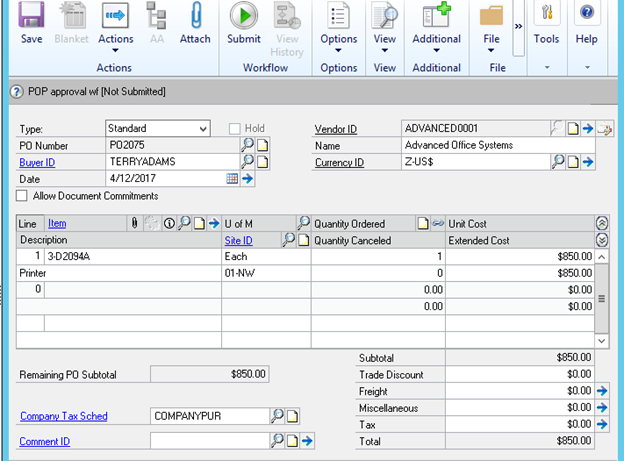
Organizations are finding lots of value out of implementing workflows in their Dynamics GP systems.  Recently, we helped a business set up one to put controls around their purchasing processes.  You could use this for purchasing office supplies, raw materials, or items to support your distribution business. Additionally, it will

by Mike Gordon
Read More
GPMissingSetup 1
Dynamics GP

Dynamics GP:  Missing Setup on Inventory Item Causes Purchasing Issues

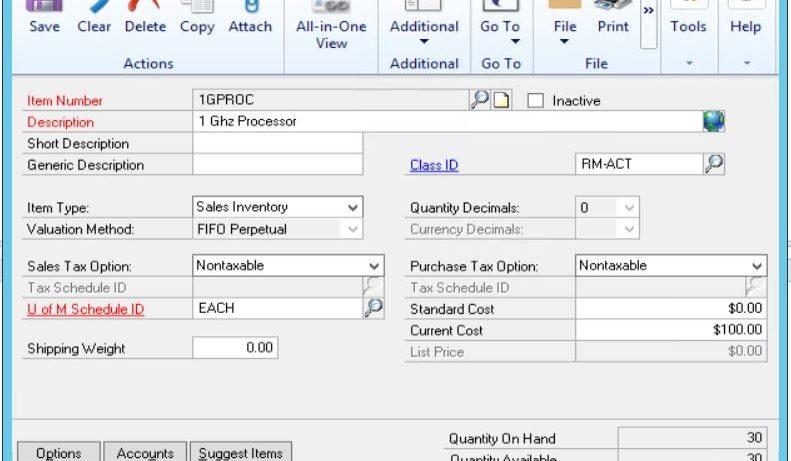
Problem & Fix I recently encountered an issue with a Microsoft Dynamics GP Purchase Order not being allowed for a specific item.  When I looked closer, I found the Inventory Item was missing setup information, which was causing the problem. Here is the Item Maintenance Card:    In the Dynamics

by Mike Gordon
Read More
AdobeStock 59543335
Dynamics GP

Is it Time to Upgrade Microsoft Dynamics GP or Dynamics SL?

Many times, we think about upgrading versions of our software but just don’t take the time to do it.  Don’t get caught with an unsupported version, you’ll miss out on important updates, hotfixes, and it could potentially cost you more in the end. The new version, Dynamics GP 2018, was

by Kayla
Read More
Webinar Graphic 2018 V2
Dynamics GP

WEBINAR: Enhancing Your Dynamics GP System with Reporting-Central

Thursday, March 15, 2018 11:00 AM - Noon (CST) Register Here Please join Crestwood Associates and our partner, Reporting-Central, for a free webinar showing you some of the great tools to help Dynamics GP users tackle daily nagging issues: Reconciling the GL with Sub-Ledgers to get the books in balance

by Kayla
Read More
ERP2 1
Dynamics GP

How Does a Microsoft Dynamics GP Upgrade Work?

Microsoft Dynamics GP Upgrade Methodology There’s a reason why our clients trust Crestwood Associates to upgrade their Dynamics GP systems to the latest version.  It’s a complicated process and we’ve done hundreds of them.  Upgrades can take anywhere from 30 to over 100 hours depending on the complexity of your

by Brandon
Read More
MR New User1
Dynamics GP

How to Add a New User in Management Reporter

Recently, we have received a handful of calls on how to add a new user to Management Reporter (MR).  So, I thought this would be a good time to revisit the process. First, you must be an MR administrator to add users. Also, the user you are adding must have

by Mike Gordon
Read More
POGPpic1
Dynamics GP

How To:  Purchase Order Prepayments in Dynamics GP 2016

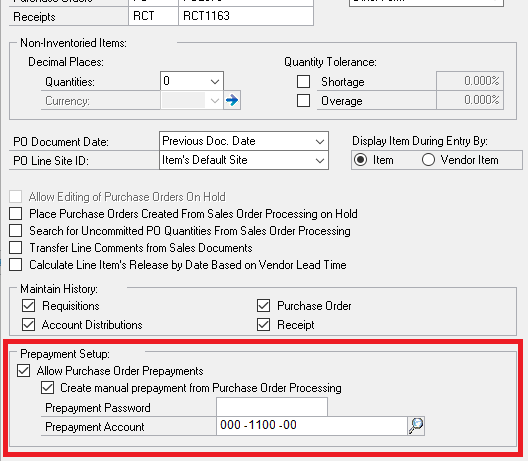
Microsoft Dynamics GP 2016 enhanced the procedure to place prepayments on purchase orders making it easier when requiring an upfront payment from customers. Setup First, you must setup prepayments in the purchase order processing window.  Go to: Tools>Setup>Purchasing>Purchase Order Processing. Click to Allow Purchase Order Prepayments and Create manual prepayment

by Mike Gordon
Read More
GPGadget 1
Dynamics GP

Dynamics GP Home Page Connect Gadget is Retired by Microsoft

Microsoft has retired the Connect gadget on the Dynamics GP home page. Microsoft used this gadget to communicate Dynamics GP community news and information to users. Now that it has been retired, you might see the following error on your home page if your Connect gadget is still in place.

by Mike Gordon
Read More
Webinar Graphic 2018 V2
Dynamics GP

WEBINAR: Making Year-end Simple – How & Why You Need a Month-end Process

Monday, February 19, 2018 1:00 - 2:00 PM (CST) Register Here! Did you know that year-end in Dynamics GP really involves just 1 more click than month-end? Lots of people skip month-end processes and then year-end is much more time consuming.  Learn how easy it is to do month-end in

by Kayla
Read More
admin ajax 1
Dynamics GP

Don’t Miss GPUG Amplify – March 20-21, 2018 | Chicago, IL

I’m excited and honored to be presenting “Explore Your GP Reporting Options” session at the upcoming GPUG Amplify conference in Chicago on March 20, 2018. I invite you to join hundreds of other leaders and learn more about Reporting, Functional, and Executive Leadership with Dynamics GP at its focus. Amplify

by Mike Gordon
Read More
GPUserSec1
Dynamics GP

Microsoft Dynamics GP – How to Get a List of Users and Access

Sometimes you need to know what access users have in Microsoft Dynamics GP. Maybe for an audit or just a routine cleanup of your system. Luckily, there are some pre-loaded or ‘canned’ reports in Dynamics GP that you can use. How to Access the User Security Reporting: To access the

by Kayla
Read More
GP2018NewFeature1
Dynamics GP

5 Exciting New Features in Microsoft Dynamics GP 2018

We have many Crestwood clients planning to upgrade to Dynamics GP 2018 in the first quarter of 2018.  You’ll want to consider upgrading too, especially if you are on Dynamics GP 2013 because mainstream support ends in April of 2018.  This means no more updates, including year-end and payroll. Here’s

by Mike Gordon
Read More
ErrorPayroll1
Dynamics GP

Dynamics GP:  Error during Payroll Year-end Update

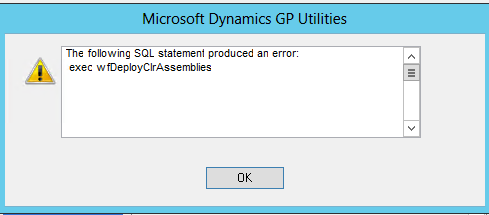
We have gotten a couple support calls about an error occurring while running the Dynamics GP utilities after installing the payroll year-end update. Error The following SQL statement produced an error:  exec w fDeployClrAssemblies [Microsoft][SQL Server Native Client 10.0][SQL Server]Assembly 'system.directoryservices, version=2.0.0.0, culture=neutral, publickeytoken=b03f5f7f11d50a3a.' was not found in the SQL

by Mike Gordon
Read More
Webinar Graphic 2018 V2
Dynamics GP

WEBINAR: Microsoft Dynamics GP 2018 First Look

Tuesday, January 30, 2018 11:00AM - Noon (CST) Register Here Join Mary Lenehan from Crestwood for a first look at Microsoft Dynamics GP 2018.  This live demo will cover many of the great new features and updates; including: Comprehensive Doc Attach User experience updates Financials & HRP Workflow improvements System

by Kayla
Read More
Webinar Graphic 2018 V2
Acumatica Cloud ERP

WEBINAR: The Hidden Costs of Inventory Spreadsheets

Thursday, February 22, 2018 11:00AM - Noon (CST) Register Here Are you thinking about moving on from your inventory spreadsheets?  If so, you don't want to miss this free, no-strings webinar with Netstock - the leader in Inventory Management Systems. If you're like other businesses, you've had problems and wasted

by Kayla
Read More
DynGPSlow1
Dynamics GP

Microsoft Dynamics GP Document Attach Button is Slow

Have you noticed the Doc Attach button in some companies responds slow? We had a client with this problem.  When they clicked the “Attach” button, there was a long delay for the dialog box to appear to allow selection of the documents to attach. We hadn’t heard of this happening

by Brandon
Read More
CrashMR1
Dynamics GP

Crashing and Connection Errors with Management Reporter Console, Dynamics GP, and SQL

Error and fix when your Management Reporter console crashes. This one is great!  My client was having issues with the Management Reporter (MR) Configuration Console crashing as soon as you tried to open it, and the MR Process Service kept stopping after you would start it. I was also getting

by Brandon
Read More
DocAtt1
Dynamics GP

Microsoft Dynamics GP 2018 New Doc Attach Feature

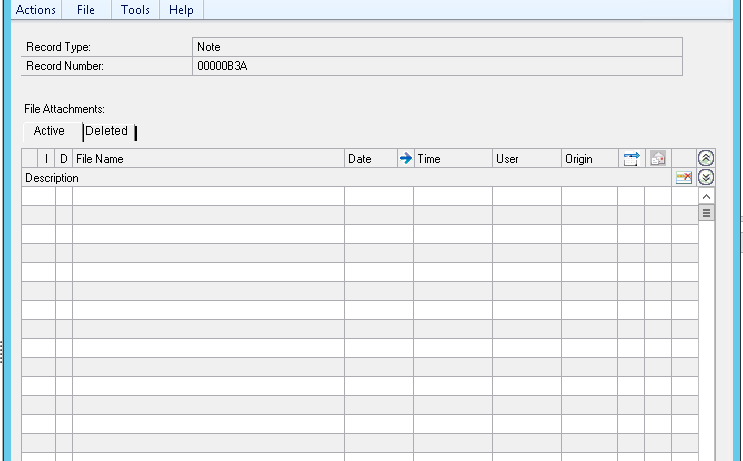
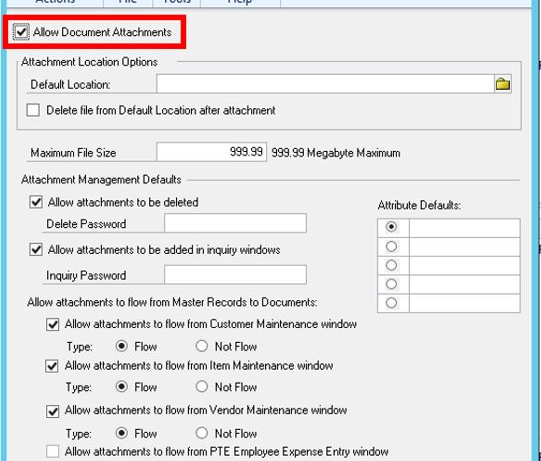
It’s here! Released December 1, 2017, Dynamics GP 2018 has finally arrived. There are many great new features available and here are the ones I’m most excited about. First, all the new Document Attach features. We’ve seen customers use this feature for years now, but in the new version, you

by Mike Gordon
Read More
MFSPEC1
Dynamics GP

Management Reporter (MR) and Dynamics GP Legacy Connection – Caution When Importing a New Company

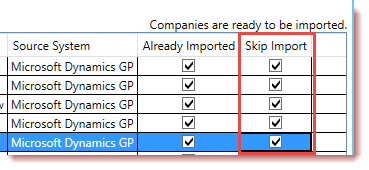
CAUTION - If you’re using MR with the Legacy connection to Microsoft Dynamics GP, when importing a NEW company to MR, be careful.  You want to make sure you check the boxes for “Skip Import” for all the existing companies that are setup if you are using multiple Building Block

by Brandon
Read More
update software
Dynamics GP

Dynamics GP 2017 Year-end Updates RELEASED!

Get ready for year-end 2017 with Microsoft Dynamics GP - the year-end updates have been released!   There have been changes in many areas including Payroll, Fixed Assets, Distribution, eConnect, and many more. 4 things to do today: Sign up for one of Crestwood's Dynamics GP Year-end events. Email our

by Kayla
Read More
DownersGrove
Dynamics GP

Attend a free Dynamics GP Year End Event

Join Crestwood for the 2017 Microsoft Dynamics GP year-end training.  Our team will teach you best practices for year-end close, things to look for during this process and answer your questions. We will have live, in-person training at the Chicago and Madison locations.  Also, we will be broadcasting the Chicago training

by Kayla
Read More
YE CHECKLIST
Dynamics GP

Start Preparing for 2017 Year-end with Dynamics GP

The 2017 calendar year-end is approaching and Microsoft is planning the release of the Dynamics GP year-end update for mid to late November.  As we begin thinking about the end of 2017, some topics require planning and decision-making. Download our guide below and review the checklist items to make sure

by Dan Milani
Read More
A Shield CompanyBack to top